
Are you learning what is technical SEO? Learn with Thoroughbred Innovations!
Search engine optimization can sound deceptively simple.
Choose the right keywords. Create useful content. Optimize your website. Build authority. Wait for Google to find you.
But what happens when Google can’t properly find, crawl, understand, or index your website in the first place?
That’s where technical SEO enters the picture.
So, what is technical SEO?
Technical SEO is the process of improving the behind-the-scenes elements of a website so search engines can efficiently access, crawl, understand, and index its pages while users receive a fast, secure, accessible, and mobile-friendly experience. It includes everything from website architecture and indexing controls to page speed, structured data, HTTPS, redirects, canonical URLs, and mobile usability.
Google’s own documentation makes the importance of these fundamentals clear. For a page to meet Google’s minimum technical requirements, Googlebot must not be blocked, the page must work and return a successful HTTP status code, and it must contain indexable content. Meeting those requirements doesn’t guarantee indexing or rankings, but technical problems can prevent a page from being eligible to appear at all.
At Thoroughbred Innovations, learning what is technical SEO is part of how we approach web design, development, and search optimization for small businesses. A beautiful website isn’t enough if the technical foundation underneath it is holding the business back.
Here’s what small-business owners need to know.

What Is Technical SEO in Simple Terms?
Imagine opening a new store.
You’ve invested in a beautiful interior.
Your products are excellent.
Your staff is ready.
Your signs look fantastic.
There’s just one problem:
The front door is locked, the address is wrong, and nobody can figure out how to get inside.
That’s essentially what can happen to a website with serious technical SEO problems.
You can publish outstanding content targeting exactly what your customers are searching for, but search engines still need to discover and process that content.
Google describes Search as having three broad stages: crawling, indexing, and serving search results. Google first discovers and downloads pages, analyzes their content during indexing, and can then serve relevant indexed information when people search.
Technical SEO helps make that process possible.
It’s less about telling Google: “This is the greatest plumber in Kentucky!”
And more about making sure Google can actually find the plumber’s website, access its pages, understand how they’re organized, and determine what should be indexed.
What Is Technical SEO vs. On-Page SEO
This distinction can make SEO much easier to understand.
On-page SEO primarily deals with what’s on an individual page, including its content, keyword targeting, headings, title, internal links, images, and other elements.
Technical SEO focuses more heavily on how the website functions underneath that content.
There is plenty of overlap.
For example, internal linking is useful for readers, helps establish relationships between content, and helps search engines discover pages. Page performance is technical, but it directly affects the experience of people reading your content.
That’s why we don’t believe web design and SEO should exist in completely separate worlds.
Our approach to professional web design services incorporates search optimization alongside design, development, performance, mobile usability, accessibility, and conversion strategy.
Great content needs a strong technical foundation underneath it.

1. Crawlability: Can Search Engines Find Your Pages?
Crawling is one of the foundations of understanding what is technical SEO.
Google uses automated programs called crawlers to discover pages across the web. Those crawlers follow links and use other discovery methods to find new and updated content.
A website can accidentally make this process more difficult.
Technical SEO professionals may evaluate things such as:
- Robots.txt directives
- Internal links
- XML sitemaps
- Redirects
- Server responses
- Orphaned pages
- Broken links
- JavaScript implementation
- Website architecture
A robots.txt file, for example, can tell crawlers which URLs they are allowed to request. An incorrectly configured robots.txt file can unintentionally prevent Googlebot from accessing content you actually want Google to discover.
Google also recommends making links crawlable so it can discover additional pages through your site’s links.
For a small-business website, the goal is simple:
Important pages shouldn’t be unnecessarily difficult for search engines to find.
2. Indexability: Can Your Pages Appear in Search?
Crawling and indexing aren’t the same thing.
A search engine may discover a URL without ultimately adding that page to its searchable index.
Google explicitly notes that a sitemap can help it learn about a website but doesn’t guarantee indexing or improve rankings by itself.
Learning what is technical SEO therefore involves investigating whether the pages you want in search results are actually eligible and configured for indexing.
Problems can arise from:
Noindex directives: A page may explicitly tell search engines not to index it.
Canonicalization problems: Google may consider another URL the primary version of substantially similar or duplicate content.
Redirect problems: URLs may point somewhere unexpected or create unnecessary chains.
Server errors: Pages may return unsuccessful HTTP status codes.
Blocked resources: Search engines may be prevented from accessing something important.
Duplicate URLs: Multiple URLs can sometimes represent the same or highly similar content.
Google provides extensive documentation for controlling crawling, indexing, canonicalization, sitemaps, redirects, mobile pages, metadata, and related technical elements.
For business owners, the important takeaway is:
Publishing a page and having that page properly available to search engines are two different things.
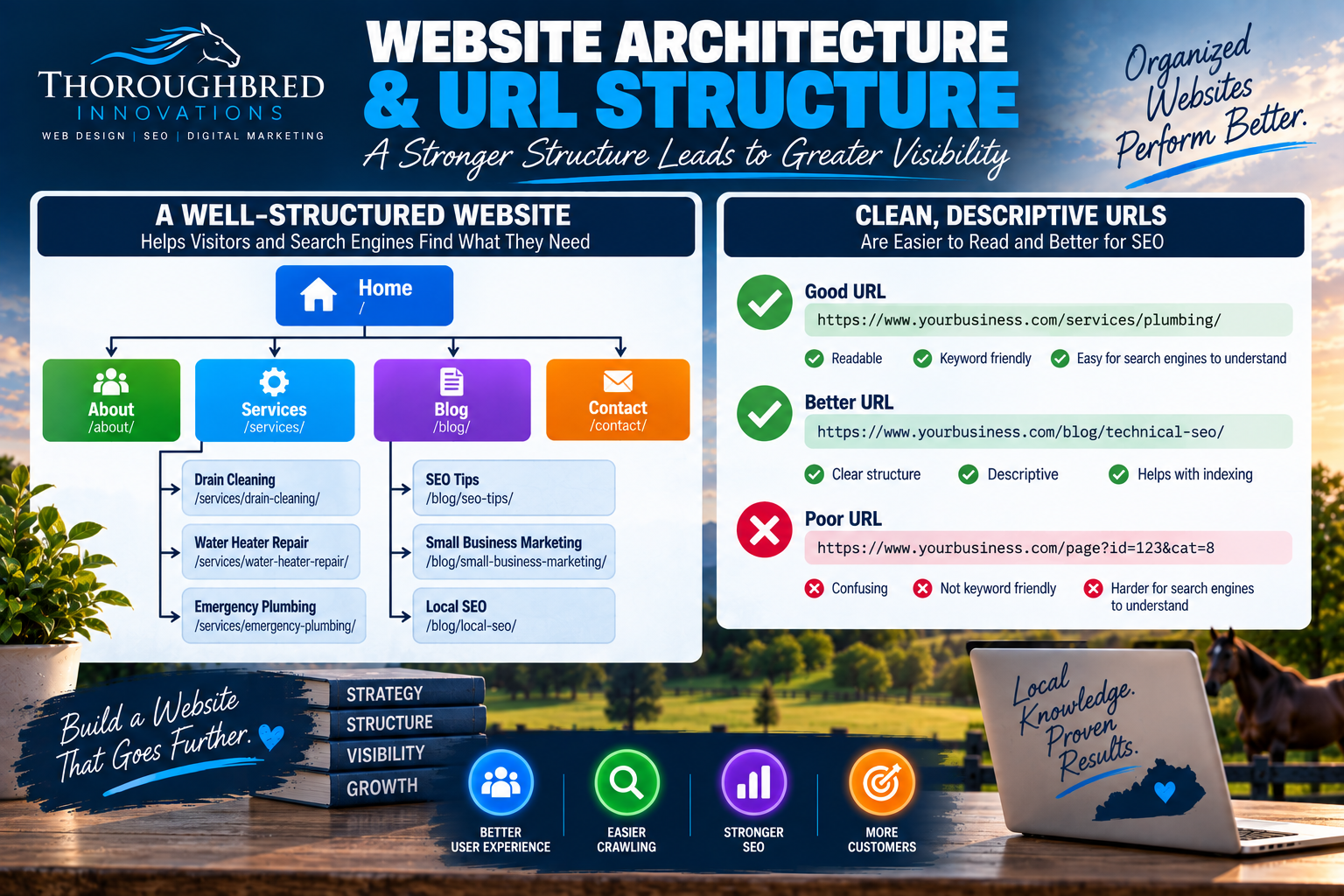
3. Website Architecture and URL Structure
Understanding what is technical SEO also means considering how the website is organized.
Imagine a website with 200 pages dumped into one enormous, confusing mess.
Customers would struggle.
So would search engines.
Logical website architecture can make important information easier to reach.
For example, a plumbing company’s structure might look something like:
Home → Services → Drain Cleaning
Home → Services → Water Heater Repair
Home → Services → Emergency Plumbing
That’s much more intuitive than scattering pages around with no obvious relationship.
URLs should also be understandable.
Something like: example.com/services/water-heater-repair/
is much more useful to humans than a confusing collection of unnecessary parameters and identifiers.
Google recommends using crawlable URL structures and organizing URLs logically in ways that are intelligible to people.
Website architecture isn’t merely an SEO exercise.
It also makes your website easier for customers to navigate.
4. Page Speed and Website Performance
If you’ve ever clicked a website and waited…
and waited…
and waited…
you already understand why performance matters.
Understanding what is technical SEO often involves evaluating factors that may slow down a website, including:
- Oversized images
- Excessive JavaScript
- Unnecessary plugins
- Poor caching
- Bloated code
- Third-party scripts
- Font loading
- Server performance
- Unoptimized media
- Inefficient page construction
Google’s developer guidance specifically recommends ensuring websites are secure, fast, accessible to all, and functional across devices.
Performance optimization isn’t about chasing a perfect score simply for bragging rights.
It’s about creating a better experience.
When someone searches for a Kentucky roofing company because water is coming through their ceiling, they aren’t interested in admiring a loading spinner.
They want the phone number.
Fast websites remove unnecessary friction between customers and businesses.
Thoroughbred Innovations discusses these performance considerations in greater detail in our web development services for Lexington businesses, where development, performance, SEO, accessibility, security, and scalability are considered together.
5. Mobile-Friendly Websites
Your customers aren’t exclusively searching from desktop computers.
They’re searching while sitting on the couch.
Standing in a store.
Waiting for an appointment.
Sitting in their car.
Walking around downtown Lexington.
Your website needs to function across different screen sizes.
Knowing what is technical SEO and responsive web development should ensure that mobile users can:
- Read the content
- Navigate the website
- Tap buttons comfortably
- Complete forms
- View images properly
- Find contact information
- Access the same important content
Michigan Technological University’s “what is technical SEO” documentation notes that Google uses a mobile crawler as its default crawler for websites.
Mobile usability therefore isn’t an optional bonus feature for a modern business website.
It’s fundamental.

6. HTTPS and Website Security
See that little https:// at the beginning of a website address?
That matters.
HTTPS encrypts data transmitted between a visitor’s browser and the website.
Technical SEO audits should consider whether the website is consistently served over HTTPS and whether technical configuration problems create insecure or conflicting versions.
Google’s developer guidance specifically includes security among the fundamental characteristics website owners should address.
Security obviously extends far beyond HTTPS, and no responsible web company should pretend that installing an SSL certificate makes a website invincible.
But a properly secured connection is one piece of a professionally maintained website and helpful in understanding what is technical SEO.
This is also where hosting, development, security, and SEO begin overlapping.
As we discussed in our recent guide to website hosting services in Lexington, hosting shouldn’t simply provide somewhere to dump your website files. The technical environment should support the website’s performance, reliability, security, and long-term management.
7. XML Sitemaps
An XML sitemap is essentially a file that can help search engines learn about URLs on your website. It is very important to know what it is when learning what is technical SEO.
For small businesses, this can be particularly helpful as the website expands.
Maybe you start with:
10 service pages.
Then you add location pages.
Then educational articles.
Then FAQs.
Then new services.
Then additional resources.
A properly maintained sitemap helps communicate which pages are available.
But here’s an important distinction:
A sitemap isn’t an SEO cheat code.
Submitting a URL in a sitemap doesn’t guarantee Google will index it, and Google explicitly states that a sitemap doesn’t increase a page’s ranking.
It’s a technical discovery tool—not a magical ranking button.

8. Canonical URLs and Duplicate Content
Sometimes multiple URLs can display identical or very similar content. Knowing how canonicalization affects rankings is important when learning what is technical SEO.
This can happen because of:
- URL parameters
- HTTP and HTTPS variations
- WWW and non-WWW versions
- E-commerce filtering
- Tracking parameters
- Duplicate pages
- Content-management systems
Canonicalization helps indicate the preferred version among duplicate or substantially similar URLs.
Google also performs its own canonicalization during indexing, determining which page it considers representative of a group of duplicates.
Small-business owners don’t necessarily need to become canonical-tag experts.
But whoever manages the website should understand the concept.
Otherwise, seemingly harmless technical configurations can create unnecessary duplication and confusion.
9. Redirects and Broken Pages
Businesses change.
Services disappear.
Websites get redesigned.
URLs get updated.
Blog posts move.
Pages get consolidated.
That’s normal.
But when an old URL disappears, you should consider what happens next.
A redirect can send visitors and search engines from an outdated URL to an appropriate new location.
Knowing what is technical SEO during audits often uncover issues such as:
Broken internal links
404 errors
Unnecessary redirect chains
Redirect loops
Redirects pointing to irrelevant destinations
Not every 404 is automatically a disaster. Sometimes a page genuinely no longer exists and doesn’t have an appropriate replacement.
The goal isn’t to eliminate every 404 at all costs.
It’s to manage URLs intentionally.
Google maintains dedicated documentation for redirects, HTTP status codes, site moves, and other URL changes because these technical signals affect how it crawls and processes websites.
10. Structured Data
Structured data is standardized markup that provides explicit information about the meaning of a page and is important to understanding what is technical SEO.
Depending on the content and whether it meets Google’s requirements, structured data can make pages eligible for certain enhanced search-result experiences.
Google explains that structured data can provide explicit clues about a page’s meaning and potentially enable eligible rich results.
Different structured-data types exist for different kinds of content and entities.
The important word here is appropriate.
Adding random schema markup everywhere isn’t good to understanding what is technical SEO.
It needs to accurately represent the content users can actually see and comply with the requirements for the relevant feature.

11. Internal Linking
Internal links connect one page of your website to another.
For example, an article about what is technical SEO might naturally direct someone to our guide explaining what makes a good business website.
That helps a reader continue learning.
It also helps search engines discover pages and understand relationships throughout the website.
Google specifically recommends making links crawlable so its systems can find other pages through them.
A well-structured internal linking strategy can also help prevent orphan pages—pages with few or no meaningful links pointing to them.
If a page is important enough to exist, there should usually be a logical way for people and search engines to reach it.
12. Google Search Console
You don’t have to guess what Google is seeing.
Google Search Console provides website owners with information talking about what is technical SEO and how their sites are performing in Google Search.
Google’s documentation describes Search Console as a tool that helps website owners, developers, and SEO professionals understand website performance in Google Search.
It can help identify or investigate:
- Indexing issues
- Search queries
- Clicks and impressions
- Page performance
- Crawl information
- Individual URL status
- Sitemaps
- Core Web Vitals
- Enhancements
- Security-related issues
The URL Inspection tool is particularly valuable when diagnosing an individual page because it can help you understand how Google sees a URL. Google specifically recommends it when determining whether Googlebot can access a page.
Search Console won’t fix your website for you.
But it gives you valuable information for understanding what’s happening.
Does Technical SEO Guarantee Higher Rankings?
No.
And anyone telling you that fixing one technical issue guarantees the #1 spot on Google is oversimplifying SEO.
Google itself states that meeting its technical requirements doesn’t guarantee that a page will be crawled, indexed, or served in search results.
Knowing what is technical SEO creates a foundation.
Think about it like building a house.
You need a solid foundation.
But nobody buys a house because:
“Wow! Look at that concrete slab!”
They care about the whole house.
SEO works similarly.
You need:
Technical SEO + Helpful Content + Keyword Strategy + On-Page Optimization + Local SEO + Authority + User Experience + Consistency
Understanding what is technical SEO makes sure the foundation isn’t sabotaging everything built on top of it.

What Is Technical SEO And What It Matters for Small Businesses
Small businesses can’t afford to waste opportunities.
Suppose you’ve invested in professional web design and spent months creating useful content.
You finally start targeting searches such as:
“roof repair Lexington KY”
“bakery Winchester KY”
“plumber near me”
“web design in Kentucky”
“what is technical SEO”
But important pages aren’t indexed.
Or your navigation creates orphan pages.
Or an accidental noindex directive blocks a major service page.
Or the mobile website doesn’t function correctly.
Those technical issues can undermine work you’ve already paid for.
That’s why asking what is technical SEO isn’t just a question for developers.
It’s a business question.
Your website is part of your marketing infrastructure.
Its technical health affects whether that infrastructure can do its job.
Technical SEO Should Begin With the Website
One of the biggest mistakes businesses make is waiting until after a website launches to think about SEO.
Understanding what is technical SEO helps make decisions that happen during website planning and development.
Site architecture.
Navigation.
URL structure.
Responsive design.
Internal linking.
Performance.
Accessibility.
Indexability.
Redirects.
Structured data.
Security.
These aren’t decorations added after launch.
They’re part of building the website correctly.
That’s why Thoroughbred Innovations integrates SEO into our approach to web design in Kentucky and web development rather than treating it as something to sprinkle over a finished website later. Our recent website resources emphasize architecture, URLs, internal linking, crawlability, indexability, performance, mobile usability, and structured data as considerations during development.
What Is Technical SEO? It’s the Foundation Your SEO Strategy Needs
So, what is technical SEO?
It’s the work that helps make sure your website can be efficiently accessed, crawled, understood, and indexed by search engines while providing visitors with a fast, secure, accessible, and mobile-friendly experience.
It includes:
Crawlability.
Indexability.
Website architecture.
Page performance.
Mobile usability.
HTTPS.
Sitemaps.
Canonicalization.
Redirects.
Structured data.
Internal linking.
Technical monitoring.
None of those elements replaces great content.
None replaces keyword research.
None replaces building a trustworthy business.
And none guarantees rankings.
But without a strong technical foundation, everything else you’re doing to improve search visibility may have to work much harder.
At Thoroughbred Innovations, we help Kentucky small businesses build websites with SEO in mind from the beginning. Our approach combines professional design, development, understanding what is technical SEO, content, mobile optimization, website performance, accessibility, local SEO, and conversion strategy.
Because your website shouldn’t merely look good to customers.
It should also be built so search engines can find it, understand it, and give those customers an opportunity to discover it.